Everything in Punchboo
A time clock for a crew on the floor. The tablet punches, the office counts. Here is all of it.
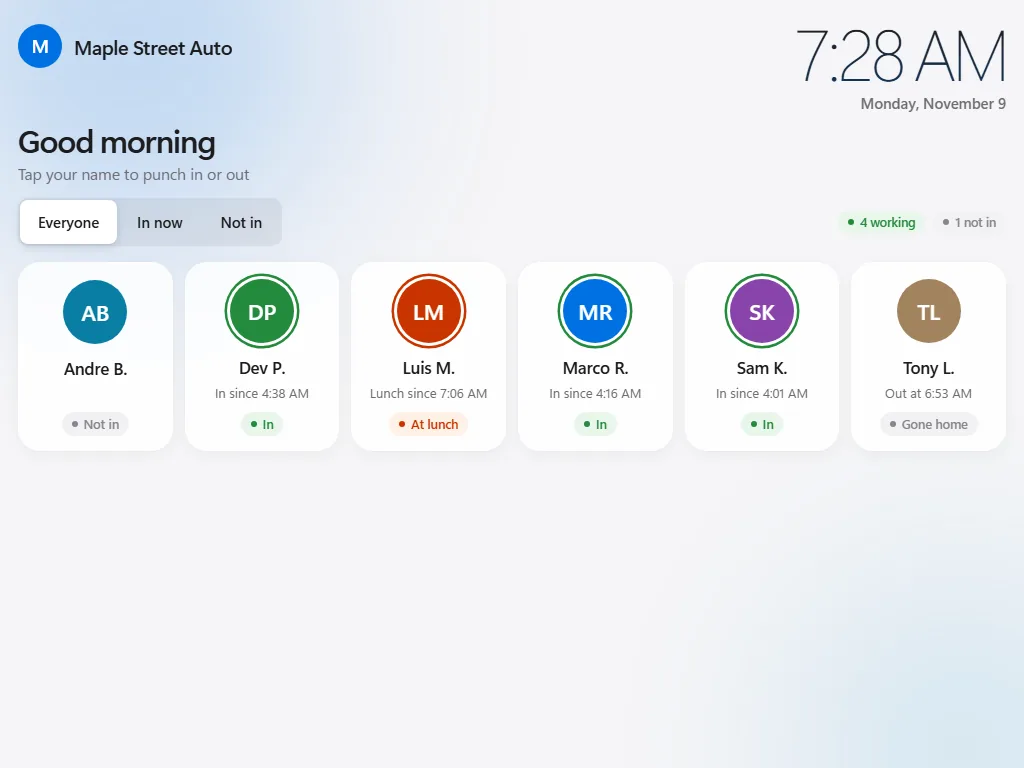
Tap your name. That's the training.
The clock runs in the browser on any iPad, Android tablet or Windows touchscreen. Set it up once with a 6-digit code from your office; from then on it shows your crew's names and the time.
- One tile per person: in, at lunch, gone home or not in
- Punch in, start lunch, back to work, punch out
- "My hours": each person can see their own pay period (times only, no pay)
- PIN mode: type a PIN instead of tapping a name
- Your company name or logo at the top, and a greeting
- Several tablets on paid plans, one on the free plan
Works offline
When the internet drops, punches are saved on the tablet with the real time and sent later by themselves. They are marked as offline punches in the office. The first setup and "My hours" need the internet.
PINs and the shop Wi-Fi lock
Give anyone a PIN and the tablet asks for it before a punch. Turn on the Wi-Fi lock and punching only works from your shop’s own connection. The tablet uses the shop clock, not its own.
Lock it to the clock
Use the tablet’s own kiosk setting (Guided Access on iPad, app pinning on Android, kiosk mode on Windows) so the tablet does nothing else. The setup guide walks you through it.
Your office, on your phone.
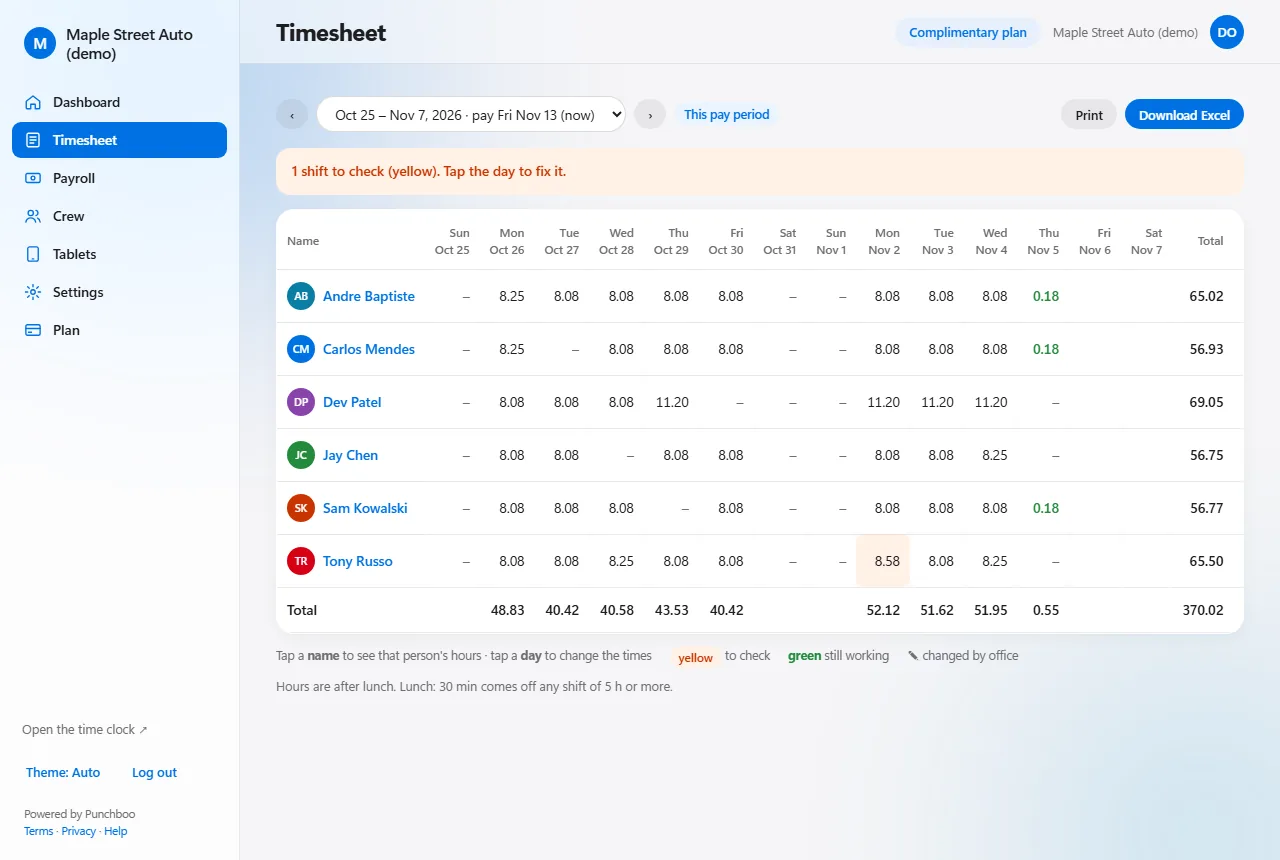
Log in from any browser. The dashboard shows who is working right now, hours so far today, and anything that needs a look. The timesheet shows the pay period, one row per person, one column per day.
- Tap a day to fix a time; the original stays in the history
- Forgotten punch-outs are closed after 16 hours and flagged
- Short, long or missing lunches are flagged
- Weekly or bi-weekly pay periods, with the pay day you choose
- Print any timesheet
- Two roles: owner and manager
Overtime by province
Weekly and daily overtime thresholds for your province are filled in when you create your shop, double time where it applies (BC after 12 hours). Overtime is paid at 1.5 times the regular rate. Change the rules for the shop or for one person. Averaging agreements are not handled.
Lunch rules
Take a set lunch off automatically after a shift reaches a certain length, or let the crew punch lunch themselves. Set a shortest lunch, and decide whether an early return is blocked or just flagged.
Shift rules
Shift start and end, a grace period for late arrivals, pay from the punch or from shift start, rounding if you want it. Each setting shows a warning where employment rules may apply.
Payroll numbers, ready for your accountant.
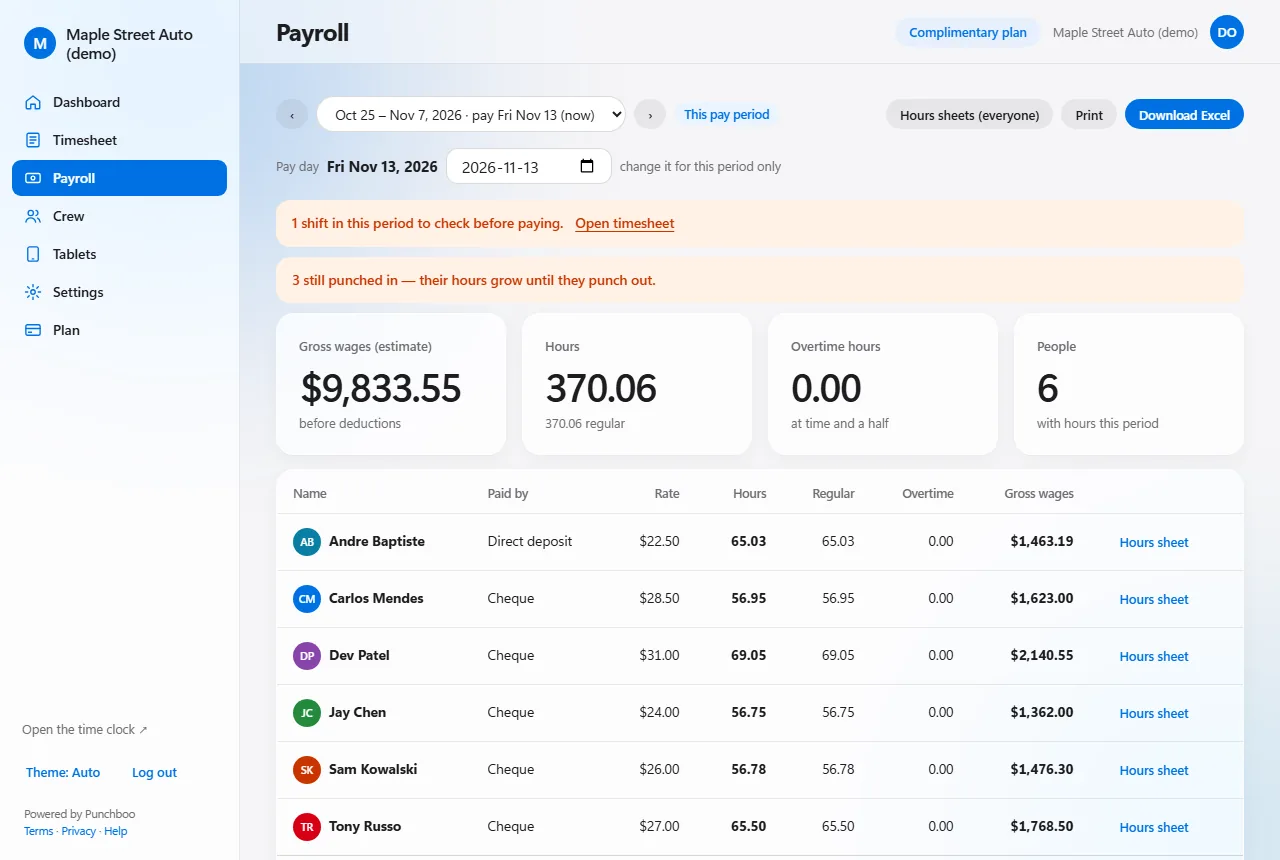
Every paid plan has every feature. The payroll page adds up the pay period per person: regular, overtime and double-time hours, the rate, and a gross-wage estimate. Download it as Excel, or print an hours sheet for one person and any dates.
- Gross wages (estimate) per person and for the shop
- Excel downloads: timesheets, payroll, hours sheets, year-end
- Hours sheets for any dates, showing every change made by the office
- Email alerts: late, not in, forgot to punch out, long lunch (coming soon)
- Unlimited tablets
Punchboo is a time clock, not a payroll service. Gross wages are an estimate: it does not calculate income tax, CPP, EI, vacation or holiday pay, and it does not pay anyone. You hand the hours to your accountant or payroll service.
Free for up to 3 people
Punches, hours, overtime, lunch rules, PINs and the office, free for as long as you like, with 1 tablet. No card to start.
Your data is yours
Print any timesheet on any plan; download Excel files on paid plans. Every change to a punch keeps the old time on record.
Nothing to install
The tablet and the office both run in the browser. Updates happen by themselves, overnight, when the tablet is idle.
See it with your own crew.
Create your shop, add your crew, set up a tablet. About ten minutes.
Create your shop, free